
How it works
InboxTidy watches selected mailboxes, reviews new emails, places them into useful categories, and prepares draft replies where a response is needed. Users keep working in Outlook, and your business keeps control of the data inside Microsoft 365.
Simple Setup
Guided from start to finish
InboxTidy is installed inside your own Microsoft environment, with support from us throughout the process. We work with your IT team or IT provider to handle the setup, explain what access is needed, and make sure everything is ready before your team starts using it.


Support and adjust
You are not left to work it out alone. We help your team understand what InboxTidy is doing, how to review draft replies, and how to adjust categories when your process changes.
Built on Microsoft | Deployed in your Tenant
InboxTidy is a managed Microsoft Power Platform solution,
deployed directly into your own Microsoft tenant.
It is built to work within the Microsoft services your business already trusts, using Power Automate, Microsoft Graph, Dataverse, and Azure Key Vault to handle processing securely and keep control where it belongs, with you. Credentials and secrets are stored securely, access is restricted to authorised accounts only, and the solution works within clear boundaries set inside your environment.
Deployed into your Microsoft tenant and
works with trusted Microsoft services
For IT and security teams, the technical model is straightforward. InboxTidy uses Microsoft services to connect to selected mailboxes, process email events, apply settings, and create draft replies where enabled.
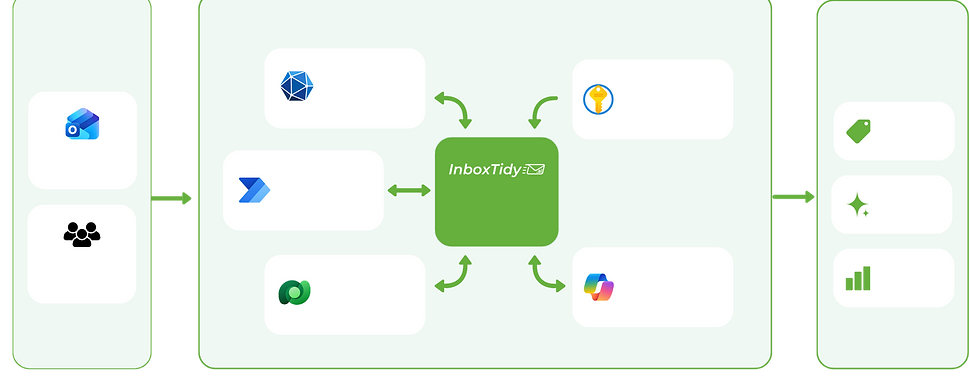
Microsoft
Graph
Power
Automate
Dataverse
Azure
Key Vault
Microsoft
Hosted AI
Personal
Mailboxes
Shared
Mailboxes
Smart email handling inside your Microsoft Tenant
Emails In
Your Microsoft Tenant
Results
Categorise Emails
Draft
Replies
Reporting
& Control

Built inside your Microsoft tenant, InboxTidy helps turn busy inboxes into a clearer, more manageable workflow. It works with trusted Microsoft services, so you get a smarter way to handle email without giving up control.
InboxTidy only works with the mailboxes you choose to connect.